ProCurve Switch(config)# crypto key generate ssh
ProCurve Switch(config)# ip ssh
ProCurve Switch(config)# no telnet-server
Read more...
Showing posts with label HP. Show all posts
Showing posts with label HP. Show all posts
Tuesday, February 11, 2014

Disable Plain-Text HTTP server on HP Switch(s) HTTP-->HTTPS
Disable Plain-Text HTTP server on HP Switch(s) HTTP-->HTTPS
Switch(config)# no web-management plaintext
Switch(config)# crypto key generate cert 1024
Switch(config)# crypto host-cert generate self-signed
Validity start date [01/01/1970]: 08/06/2013
Validity end date [08/09/2011]: 08/06/2023
Common name [0.0.0.0]:
Organizational unit [Dept Name]:
Organization [Company Name]:
City or location [City]:
State name [State]:
Country code [US]:
Switch(config)# web-management ssl
Switch(config)# wr mem
Read more...
Switch(config)# no web-management plaintext
Switch(config)# crypto key generate cert 1024
Switch(config)# crypto host-cert generate self-signed
Validity start date [01/01/1970]: 08/06/2013
Validity end date [08/09/2011]: 08/06/2023
Common name [0.0.0.0]:
Organizational unit [Dept Name]:
Organization [Company Name]:
City or location [City]:
State name [State]:
Country code [US]:
Switch(config)# web-management ssl
Switch(config)# wr mem
Read more...
Wednesday, March 17, 2010
DL380G6 Loud FAN Noise
Steps that explained below will reset NVRAM configuration for motherboard.
1) Power Off your Server and unplug power cords.
2) To prevent RAID configurations from losting, remove all of your disk.
3) You will see very little switch in front of battery.
4) Configure the number6 to on state
5) Power on server for 10 seconds, then power off and unplug the cords.
6) Configure the number 6 to off state again on switch.
7) Insert disks , power on server.
It works for me! Be carefull while changing switch states.
Read more...
1) Power Off your Server and unplug power cords.
2) To prevent RAID configurations from losting, remove all of your disk.
3) You will see very little switch in front of battery.
4) Configure the number6 to on state
5) Power on server for 10 seconds, then power off and unplug the cords.
6) Configure the number 6 to off state again on switch.
7) Insert disks , power on server.
It works for me! Be carefull while changing switch states.
Read more...
Saturday, May 9, 2009
HP NC373i Disappears after Installing HP PSP Version 8.x
If your NIC Card (NC373i) has disappeared on HP BL460c server after applying PSP 8.x Pack follow the steps below to bring it back.
To resolve this issue, delete the wdf01000.sys from c:\windows\system32\drivers\ , and then re-run the HP PSP package.
Read more...
To resolve this issue, delete the wdf01000.sys from c:\windows\system32\drivers\ , and then re-run the HP PSP package.
Read more...
Blue Screen Error 0x0000007E (0x00000005, 0x80888D615, 0xF7906C08, 0xF7906904) on HP Servers
If you are getting Blue Screen Error 0x0000007E (0x00000005, 0x80888D615, 0xF7906C08, 0xF7906904) on HP BL460c while trying to shutdown your HP server (BL,DL series ) read and apply the steps below;

Cause : You probably have installed the PSP 7.80 nic drivers (v3.0.5).
Solution : You should rollback your driver to previous version or apply the latest version of your Nic drivers.
I have applied the CP008415.exe pack from PSP 8.00 and the problem has gone away now.
If your are trying Nic drivers coming with PSP 8.20 , you could experience the problem;
Notice: (Revision) HP NC-Series Broadcom 1GbE Multifunction Driver for Windows Server - First Update to Version 4.6.16.0 To Avoid Message "HP Virtual Bus Device Installation Requires a Newer Version. Version 4.6.16.0 is Required."
Check the Link Below;
http://h20000.www2.hp.com/bizsupport/TechSupport/Document.jsp?objectID=c01684544&dimid=1002159936&dicid=alr_apr09&jumpid=em_alerts/us/apr09/all/xbu/emailsubid/mrm/mcc/loc/rbu_category/alerts
Read more...

Cause : You probably have installed the PSP 7.80 nic drivers (v3.0.5).
Solution : You should rollback your driver to previous version or apply the latest version of your Nic drivers.
I have applied the CP008415.exe pack from PSP 8.00 and the problem has gone away now.
If your are trying Nic drivers coming with PSP 8.20 , you could experience the problem;
Notice: (Revision) HP NC-Series Broadcom 1GbE Multifunction Driver for Windows Server - First Update to Version 4.6.16.0 To Avoid Message "HP Virtual Bus Device Installation Requires a Newer Version. Version 4.6.16.0 is Required."
Check the Link Below;
http://h20000.www2.hp.com/bizsupport/TechSupport/Document.jsp?objectID=c01684544&dimid=1002159936&dicid=alr_apr09&jumpid=em_alerts/us/apr09/all/xbu/emailsubid/mrm/mcc/loc/rbu_category/alerts
Read more...
Monday, May 4, 2009
CPU(s) operating at reduced performance level due to a low power cap
You should disable power capping or set it to a value which is greater then the current in the iLO2.
Open ILO2 Choose Power Management TAB.

If power capping feature is not available;

install latest version of Power Management Module.
Read more...
Monday, April 6, 2009
View MAC Addresses of devices connected to HP Procurve Switch
Connect to HP Procurve Switch via Telnet.
Execute show mac-address command.
You will see the connected devices MAC addresses and which port they are connected to.

Read more...
Thursday, March 26, 2009
View HP Blade Server Health Status By command prompt
Firstly, you should check if telnet connection to your HP Blade Chasis is enable.
Howto Check
Telnet to your chasis.
Execute show server status all command to view all your blades health status incl.(Internal data , management processor , Thermal, Device status,...)

Read more...
Howto Check
Telnet to your chasis.
Execute show server status all command to view all your blades health status incl.(Internal data , management processor , Thermal, Device status,...)

Read more...
View all ILO IP Numbers of Blades in Chasis by command prompt
Firstly, you should check if telnet connection to your HP Blade Chasis is enable.
Open HP Onboard Administrator-->Enclosure Settings -->Network Access

Enable Telnet box must be checked.(Default is enabled)
After doing this Telnet to your Onboard Administrator IP number.
Enter the Username and Password.
In the command prompt type show EBIPA press enter. You can see all of your Blades and Interconnect devices EBIPA adresses(Enclosure Bay IP Addressing) Settings.

Read more...
Open HP Onboard Administrator-->Enclosure Settings -->Network Access

Enable Telnet box must be checked.(Default is enabled)
After doing this Telnet to your Onboard Administrator IP number.
Enter the Username and Password.
In the command prompt type show EBIPA press enter. You can see all of your Blades and Interconnect devices EBIPA adresses(Enclosure Bay IP Addressing) Settings.

Read more...
Medium currently in use by another process
You are using HP Data Protector A.05.50 and you are getting "Medium currently in use by another process" error

Solution is ;
Restart the services below;

Read more...
Thursday, March 19, 2009
The Integrated Remote Console is unavailable, it is already in use by a different client
If there is a open session to ILO and if user forget to close session ,other user cannot connect to Remote console session and get "The Integrated Remote Console is unavailable, it is already in use by a different client" warning.
In order to connect follow these steps below. I am sharing steps for Blade server , for ML/DL servers you should connect directly to ILO instead of Onboard Administration console.
1) Connect Onboard Administrator through HTTP connection. Choose releated server open Web Administration
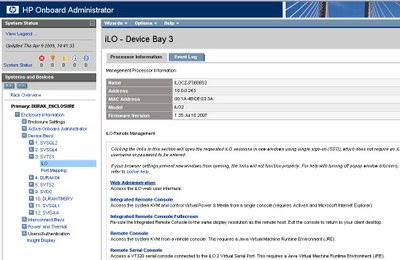
Choose Remote console>Settings > Change Remote Console
Find "Acquire to Enabled" mark as "Enable"
After Choosing "Console Acquire" , Connection will be reestablished. And warning screen will be appeared. Choose Acquire on warning screen. Then after 30 seconds Remote console will be shown.
In order to connect follow these steps below. I am sharing steps for Blade server , for ML/DL servers you should connect directly to ILO instead of Onboard Administration console.
1) Connect Onboard Administrator through HTTP connection. Choose releated server open Web Administration

Choose Remote console>Settings > Change Remote Console
Find "Acquire to Enabled" mark as "Enable"
After Choosing "Console Acquire" , Connection will be reestablished. And warning screen will be appeared. Choose Acquire on warning screen. Then after 30 seconds Remote console will be shown.
Read more...
Friday, March 13, 2009

Tuesday, March 10, 2009
Firmware Upgrade by using HP Library and Tape Tools
You can download HP LTT tool from the link below;
Download
After Completion of download. Install tool to the Server that your HP backup device connected.

Open tool from Programs Menu;
 Choose Hardware Scan then Press Continue.
Program will begin to search connected hardware;

After the search process tool will show the connected device. Double click on our device you will see detailed information.

You can perform test from this menu below;

For firmware upgrade Choose firmware button from the screen.

Program will show a warning screen stating that there no suitable firmware file on the server. Press OK to close this warning.
Press "Get Firmware from the web" button.
 Control your firmware search criteria(s) than press download. Firmware file will be downloaded to our computer. After completion of download process. Close and open LTT tools and navigate again to Firmware menu. Latest firmware file will be showned there Press "Start Update" Button to start update process. Press OK on the warning screen.

After update process if you have the warning screen below , you hace a successfull firmware upgrade.

Read more...
Download
After Completion of download. Install tool to the Server that your HP backup device connected.

Open tool from Programs Menu;
 Choose Hardware Scan then Press Continue.
Program will begin to search connected hardware;

After the search process tool will show the connected device. Double click on our device you will see detailed information.

You can perform test from this menu below;

For firmware upgrade Choose firmware button from the screen.

Program will show a warning screen stating that there no suitable firmware file on the server. Press OK to close this warning.
Press "Get Firmware from the web" button.
 Control your firmware search criteria(s) than press download. Firmware file will be downloaded to our computer. After completion of download process. Close and open LTT tools and navigate again to Firmware menu. Latest firmware file will be showned there Press "Start Update" Button to start update process. Press OK on the warning screen.
After update process if you have the warning screen below , you hace a successfull firmware upgrade.

Read more...
Wednesday, February 18, 2009
Reset Administrator Password on ILO
Search you server for the "hponcfg.exe" file.

Read more...
Write code below to notepad and Save file as "Administrator_reset_pw.xml"

Note: //newpass is your new ILO password
Copy Administrator_reset_pw.xml file to directory where hponcfg.exe file exists.
Open the command prompt (cmd)
Change the directory to where hponcfg.exe file exist (Usually c:\ProgramFiles\HP\hponcfg directory )
Type HPONCFG.exe /f Administrator_reset_pw.xml /l log.txt > output.txt (Press Enter)
After executing the command above, look inside the output.txt and log.txt files for error messages. If you have no error message(s). Your ILO password should be changed.
If you get "ERROR :firmware flash is in progress.Please wait for a while." you should use the newer version of hponcfg.exe file.
You can download the file from the links above.
Read more...
MSA 1000 ,1500 Controller and Disk Status Check
You can check your Controller , Physical and Logical Drives status by using "Array Configuration Utility CLI"

Read more...
Open Array Configuration Utility by using programs menu.
In the Command Prompt type
ctrl all show config detail (Press Enter)
By using this command you can view ;
- Logical & Physical Drives status
- RAID Status
- Stripe Size
- Serial & Model Number of Controllers and Disks
- Physical Disk Transfer Speed
- Physical Transfer Mode
- Firmware Revision
- Interface Type ( SCSI, SAS,...)
- Disk Rotational Speed...etc
Read more...
Friday, February 13, 2009


Unable to PXE boot into HP Rapid Deployment Pack
If your Proliant server unable to PXE boot into HP RDP to deploy a new operating system...
Solution :
Reset the System Using RBSU advanced option . Erase NVRAM and Disk.
Read more...
Solution :
Reset the System Using RBSU advanced option . Erase NVRAM and Disk.
Read more...
Subscribe to:
Posts (Atom)
Subscribe To This Web Site


 Posts
All Comments
Posts
All Comments


